
MEMBER HAPPINESS DISCOUNT CREDIT CODESUpdated 3 months ago
Got a Discount Credit Code? Here's How to Use It!
Our Member Happiness team sometimes issues credit and discount codes to show our appreciation or provide support. This article explains how to use these codes on your next order, as these unique codes are not saved to your account.
If goodwill is issued as a discount (£/$ or % off) code
To use your discount code, add your items to your basket and click 'Continue to Checkout'. On the checkout page, enter your code in the discount field and hit 'Apply'. Your discount credit code will be deducted from your order total.
If goodwill is issued as momentary store credit
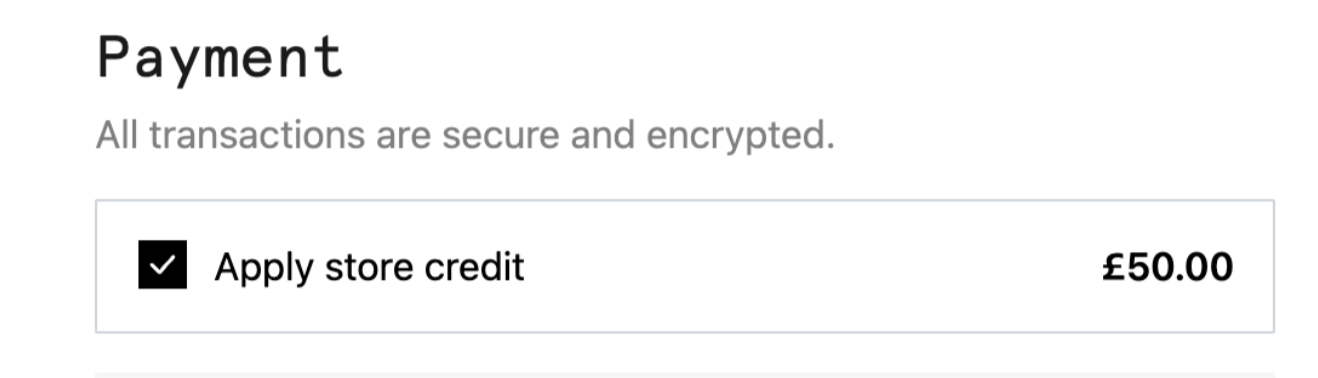
Your credit is held against your account. Just sign in and shop as normal. Make sure to tick the store credit tick box during the checkout process to apply the store credit.
Check Your Discount: Make sure the discount is reflected in your order total.
Complete Your Purchase: Finalise your order with your updated total.

Important Notes:
- Credit codes may have expiration dates, so use them promptly.
- Some credit codes may have restrictions on the products or categories they apply to, or a minimum spend threshold. (This would be noted when the code was given to you.)
- Credit codes are one-time use only and are not stackable with any other promotions.
If you have any issues applying your code, please contact our Member Happiness team for assistance.
We hope this helps! If you have any further questions, please don't hesitate to contact us.